Exercise 1: AI-Assisted Software Quality Assurance Activities
In this exercise, you will practice setting up automated static analysis, security scanning in CI/CD, and modern AI-assisted Software Quality Assurance (SQA) workflows using the Model Context Protocol (MCP). The tasks include configuring a new SonarQube project on SonarQube CSUI, integrating built-in GitLab CI security analysers, configuring an official SonarQube MCP server in your local development environment, and comparing a refactoring experiment guided by automated test verification.
The open-source project used in this exercise is a fork of Spring Petclinic REST. The project's codebase provides both production code (i.e., the application source code) and test code (i.e., unit and integration tests). Currently, the test suite covers approximately 85% of the production code when run locally using Maven.
Getting Started
Complete the following steps before starting the exercise:
- Ensure you are enrolled in the SQA (PMPL) course and have an active account on GitLab CSUI. If you do not have an account on GitLab CSUI or had been disabled, please notify the instructors immediately.
- Log in to SonarQube CSUI using your GitLab CSUI account.
- Ensure the required tools are installed on your local development machine:
- Git
- Java JDK version 17
- A container runtime, either Docker or Podman (required to run the SonarQube MCP container image locally)
- An AI agent or text editor/IDE that supports MCP clients (e.g., Visual Studio Code with GitHub Copilot, Antigravity, Codex)
- Open the project page on GitLab CSUI.
- Fork it to your own namespace on GitLab CSUI.
- Clone the codebase onto your local development machine:
1 2 | |
- Confirm that the default branch is
csui:
1 2 3 | |
- Run the test suite locally and generate the JaCoCo coverage report:
1 | |
If everything goes well, all tests should pass and the HTML coverage report will be located at target/site/jacoco/index.html. Open it in a web browser and confirm the initial baseline coverage (~85%).
Task 1: Configure SonarQube
Even though the original, upstream repository has a SonarQube configuration, your cloned repository needs its own dedicated project on SonarQube CSUI to track analyses independently.
Follow these steps to set up your SonarQube project on SonarQube CSUI:
- Open the Projects page on SonarQube CSUI. Click Create Project and choose Local project.
-
Fill in the required fields:
- Project display name:
spring-petclinic-<your-name> - Project key:
spring-petclinic-<your-name> - Main branch name:
csui
See the provided screenshot to see an example using
burhanas the placeholder name.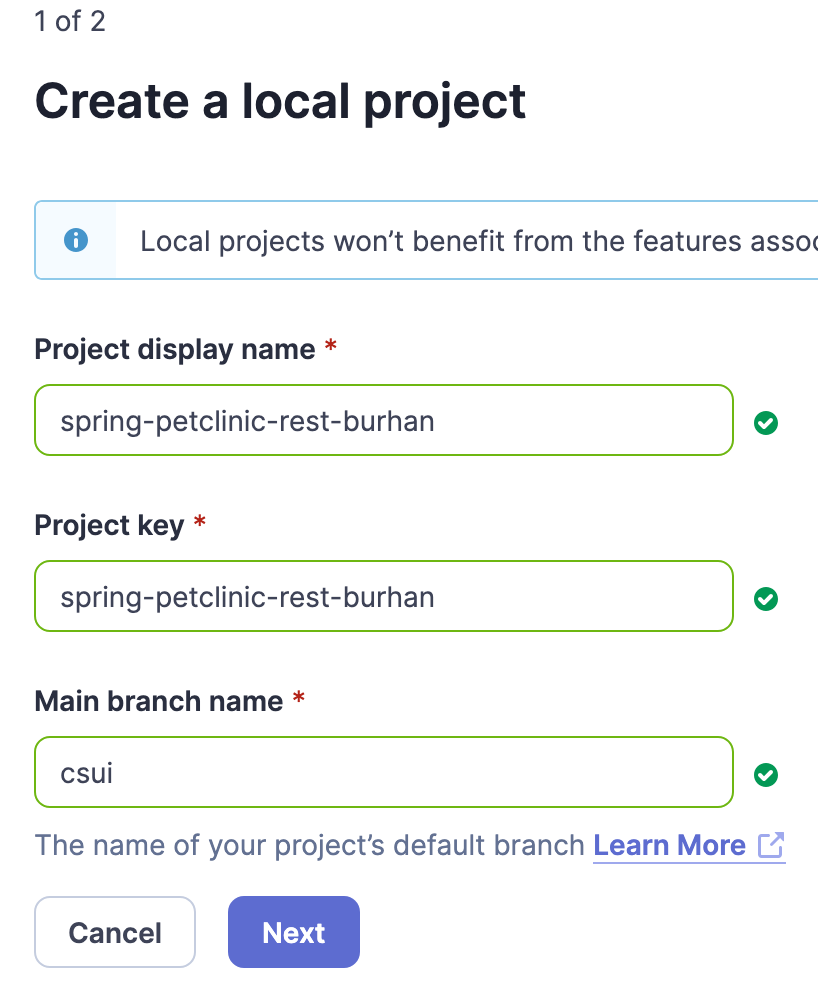 3. On the next screen, select Use the global setting and click Create project.
4. In the setup wizard under Analysis Method, select With GitLab CI and generate a new
3. On the next screen, select Use the global setting and click Create project.
4. In the setup wizard under Analysis Method, select With GitLab CI and generate a new SONAR_TOKEN. Save this token securely. You will need it for both GitLab CI and your local MCP configuration later in the corresponding task. 5. In your forked repository on GitLab CSUI, navigate to Settings > CI/CD > Variables. Add a new masked variable namedSONAR_TOKENwith the generated token value. 6. In your local repository, create a new branch: - Project display name:
1 | |
- Open
pom.xml, locate the<properties>block, and replacesonar.projectKeywith your own project key (spring-petclinic-<your-name>). - Commit and push the changes:
1 2 3 | |
- Create a Merge Request (MR) targeting the
csuibranch of your own fork repository (not the upstream class repository). - Ensure the pipeline passes, merge the branch into
csui, and verify that thesonarqube-checkjob reports analysis results on SonarQube CSUI.
Task 2: Explore GitLab CI Job Templates
To keep stay within the GitLab platform, GitLab provides several built-in CI job templates that can be included into a project's CI/CD configuration. By doing so, we can minimise the tools need to be maintained and also focus on utilising the built-in features on GitLab.
Note: GitLab does offer a code quality analysis using CodeClimate. However, it is being deprecated. Hence the emphasis on using SonarQube.
As part of the exercise, you need to modify the existing CI/CD pipeline configuration of the forked project to include the following CI job:
- Static Application Security Testing (SAST)
-
Synchronise your local
csuibranch with GitLab:
1 2 | |
-
Create a new branch :
1git switch -c task/2-update-gitlab-ci -
Open
.gitlab-ci.yml. Notice theTODOcomments indicating where security scanning templates should be included. - Add the SAST job template using GitLab's
includesyntax according to the GitLab SAST documentation. - Enable Advanced SAST by adding the environment variable
GITLAB_ADVANCED_SAST_ENABLED: "true"either in.gitlab-ci.ymlor under Settings > CI/CD > Variables on GitLab. - Add the Dependency Scanning template using the
includesyntax according to the GitLab Dependency Scanning documentation. - Commit, push, and create a Merge Request to
csui:
1 2 3 | |
- Verify that the SAST and Dependency Scanning jobs execute in the MR pipeline, then merge the branch into
csui.
At initial configuration for the first time, both SAST and Dependency Scanning jobs may not produce interesting findings because they have not established the baseline based on the current state of the main (csui) branch. In the subsequent tasks, both jobs should be able to provide findings by comparing analysis results in the new MR pipelines with the existing baseline.
Task 3: Configure SonarQube MCP Server
Large Language Models (LLMs) used in AI assistants/agents lack direct access to external static analysis platforms unless equipped with standardized tools. The Model Context Protocol (MCP) provides an open standard for AI clients to communicate with developer toolchains, including SonarQube.
SonarSource provides an official MCP server container image (docker.io/sonarsource/sonarqube-mcp) that exposes SonarQube APIs, such as issue searches, rule descriptions, code metrics, and quality gate evaluations.
These exposed APIs are made available as function signatures and inserted to the context window of the LLM when being operated by an AI assistant. Hence,
the AI assistant will have the knowledge of functions that can be invoked to complete the user's prompt.
Follow these steps to configure the SonarQube MCP server in your local development environment:
- Ensure your container engine (Docker or Podman) is running.
- Open the official SonarQube MCP Configuration Generator.
- Use the following parameters in the generator:
- Deployment / Instance Type: Self-managed / SonarQube Server
- SonarQube Server URL:
https://sonarqube.cs.ui.ac.id - Authentication Token: Your
SONAR_TOKENgenerated in Task 1 - Client: Choose your AI assistant (e.g., GitHub Copilot in VS Code, Antigravity, Codex, Claude Code)
- Copy the generated configuration snippet into your client's MCP configuration file (e.g.,
mcp_config.json,claude_desktop_config.json, or your IDE's MCP settings). - Verify the MCP connection: Prompt your AI assistant to verify MCP server connectivity to SonarQube:
1 2 | |
Confirm that your AI assistant/agent successfully invokes the MCP functions (or sometimes called as tools), such as get_project_quality_gate_status or search_sonar_issues_in_projects, and returns real analysis data from SonarQube CSUI.
Task 4: AI-Assisted SQA & Comparative Refactoring
One of main responsibilities of a QA Engineer is automating repetitive works pertaining to testing and quality improvement, along with maintaining correctness of the software. While Generative AI (GenAI) can propose and apply code refactoring quickly, it is also non-deterministic and prone to regressions or hallucinations. In this task, you will run a controlled 4-step experiment demonstrating how automated tests serve as a guardrail when orchestrating AI-driven refactoring.
Create a new working branch from csui:
1 2 3 | |
Step 4.1: Manual Identification & Triage
- Review the JaCoCo coverage report (
target/site/jacoco/index.html) generated during the Getting Started phase. - Review the list of open issues in your project on SonarQube CSUI or through your AI assistant via MCP.
- Identify a Java class that meets two criteria:
- It has existing automated test coverage (preferably >75% line or branch coverage).
- It contains multiple reported SonarQube issues or code smells (e.g., classes under
org.springframework.samples.petclinic.service,org.springframework.samples.petclinic.model, ororg.springframework.samples.petclinic.rest.advice).
Step 4.2: Manual Refactoring Baseline
- Choose one specific code smell in the selected class (e.g., unoptimized regex syntax, use of legacy synchronized classes like
StringBuffer, redundant parentheses, or raw types). - Manually refactor the code to resolve the smell according to SonarQube's recommendation.
- Run the test suite locally to verify the refactoring did not break existing behavior:
1 | |
- Once tests pass, commit your change:
1 2 | |
Note:
<rule-key>is the unique identifier of the violated SonarQube rule.
Step 4.3: Tool-Assisted AI Refactoring (Prompt Iteration 1)
Now, automate the remediation of a second code smell in the same class (or another covered class) using your AI assistant connected via the SonarQube MCP server.
- Write a prompt to your AI assistant instructing it to:
- Look up open issues for your target class using the SonarQube MCP server.
- Select one unresolved issue and refactor the code to fix it, mimicking the reasoning you applied manually in Step 4.2.
- Constraint for this step: Write a natural prompt describing the desired fix, but do not explicitly instruct the assistant to run the test suite or verify the build. Write the prompt as if you are talking naturally with your colleague.
- Record the following in your report:
- The exact prompt used
- The MCP tool calls made by the assistant
- The resulting code diff
- The LLM model used by the assistant, e.g.,
google/gemini-3.8-flash,gpt-5.6-sol - Manually run
./mvnw testlocally to evaluate whether the assistant's proposed fix passed the test suite on its first try. If tests fail, document the failure before rectifying it.
Step 4.4: Agentic Verification Loop (Prompt Iteration 2)
Refactor a third code smell, but this time apply prompt engineering to enforce an agentic verification loop.
- Reiterate on your prompt from Step 4.3 by adding strict operational constraints:
- The assistant must use SonarQube MCP to locate the issue and apply the refactoring.
- Mandatory verification constraint: The assistant must execute the project's test suite (e.g.,
./mvnw test -Dtest=<TargetTest>or./mvnw test) within its execution environment. - Self-correction constraint: The assistant must inspect the test exit code and output logs. If any test fails or compilation errors occur, it must analyze the failure, adjust its code changes, and re-run the tests until the suite passes cleanly before concluding.
- Observe how the assistant behaves under this constrained prompt.
- Record the following in your report:
- The full prompt
- Tool invocation sequence (file edits, test commands, log inspection)
- Your evaluation
Task 5: Quality Gate & Full Verification
Ensure overall project quality meets the SonarQube's Quality Gate and then make it better:
- Maintain or increase the overall project code coverage to at least 90%.
- Ensure at least 5 code quality or security issues (including those resolved in Task 4) are remediated across the project.
- Run a complete local check:
1 | |
- Push
task/3-ai-assisted-refactoringto GitLab CSUI and create a Merge Request intocsui. - Verify that all pipeline jobs, including
sonarqube-check,sast, anddependency_scanning, succeed and that SonarQube reports a passing Quality Gate.
After you have finished this exercise, you can proceed to work on the first project to apply what you have learned in your own software project work.
GenAI Usage Policy
This exercise allows GenAI and LLM tools as learning materials and tools. Even so, it is still imperative for you as course participant of SQA and user of GenAI to factually check the responses generated by GenAI.
The use of GenAI does not mean you can entirely delegate your learning process to GenAI. You enrolled in a course to learn and obtain knowledge and skills. Do not make GenAI to be the one that does the learning, making you as a "meat proxy" for them.
Allowed Uses
- Querying static analysis data and metrics via MCP servers.
- Requesting refactoring proposals for identified code smells and rule violations.
- Directing assistants to execute test suites and self-correct based on test feedback.
- Asking for explanations of compiler errors, test assertions, or SonarQube rule rationales.
Mandatory Requirements
- All AI-generated changes must be guarded and verified by automated tests.
- You must critically review all diffs produced by an AI assistant before committing.
Deliverables
At the end of this exercise, you are required to prepare the following artefacts:
- A forked repository of Spring Petclinic REST on GitLab CSUI with all task branches merged into
csui. - Working CI/CD pipeline configuration (
.gitlab-ci.yml) with SonarQube, SAST, and Dependency Scanning enabled. - An updated codebase demonstrating improved code quality, passing Quality Gates, and maintained/improved test coverage.
- A report file named
EXERCISE_1_REPORT.mdcommitted at the root of your repository using the provided template.
The due date of this exercise is 8 November 2026, 23:55 UTC+7. Submit the URL of your repository to the designated submission slot on SCELE. Please make sure any updates to the repository related to this exercise were made and pushed before the due date.
Report Template
You can use the following Markdown template as a starting point for your report that goes into EXERCISE_1_REPORT.md:
Note: you can write your report in English or Bahasa Indonesia.
1 2 3 4 5 6 7 8 9 10 11 12 13 14 15 16 17 18 19 20 21 22 23 24 25 26 27 28 29 30 31 32 33 34 35 36 37 38 39 40 41 42 43 | |
Created: 2026-10-29 08:11:33